Hi all, trying to integrate Cloudflare Turnstile ‘captcha’ on list sign up pages or templates. I have installed phplist alone on a subdomain, emails etc all working, but turnstile issue? Not sure why? Before continuing, has anyone anywhere already done this? And if so, what steps were taken. Are there any plans in the future to create such plugin? Ta.
@Shane I have created a Turnstile plugin, similar to the other captcha plugins. It seems to work for me after creating a Turnstile widget on cloudflare.com.
To install the plugin see GitHub - bramley/phplist-plugin-turnstile
The other documentation doesn’t exist yet, but you then need to enable Common plugin and this plugin and enter the site key and secret key on the Settings page.
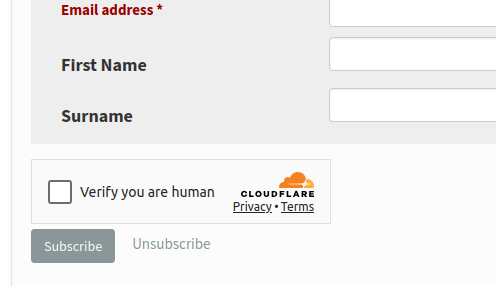
Any subscribe page will then have the Cloudflare widget
2 Likes
Perfect! Thanks so much Duncan, appreciate it. Thanks also for the very quick response.
When trying to enable Turnstile - Cloudflare I get a unspecified error message on the signup page.
@ahefner-chr Just to be clear, the “unspecified error” happens when you submit the subscription form? That error text means the response from cloudflare indicated a failure but didn’t include an error-codes variable.
You can try enabling some debug code in the plugin by adding this to the config.php file, at the end is fine
$log_options = [
    'threshold' => 'DEBUG',
    'classes' => [
        'TurnstilePlugin' => true,
    ]
];
Then when you submit the subscription form the data sent from Cloudflare will be written to a file in the directory identified by the $tmpdir variable in the phplist config.php file.
In my test that data looks like this
< HTTP/1.1 200 OK
< date: Sat, 07 Nov 2026 07:55:20 GMT
< content-type: application/json
< transfer-encoding: chunked
< connection: keep-alive
< content-encoding: gzip
< server: cloudflare
< cf-ray: a56ac66e8ad5b257-LHR
< alt-svc: h3=":443"; ma=86400
<
{"action":"","cdata":"","challenge_ts":"2026-11-07T07:55:18.000Z","error-codes":[],"hostname":"dcameron.me.uk","metadata":{"interactive":false},"success":true}
I’ve added the debugging code to the config file but nothing is being written to the /tmp/phplist directory. I made sure the directory is accessible by www-data as well.
Config entry:
$tmpdir = ‘/tmp/phplist’;
$log_options = [
‘threshold’ => ‘DEBUG’,
‘dir’ => ‘/tmp/phplist’,
‘classes’ => [
        ‘TurnstilePlugin’ => true,
]
];
@ahefner-chr The code you have shown is using “smart” single quotes, not real single quotes. Is that also in the config.php file?
The quotes were a copy paste conversion from the terminal to the website apparently.
$tmpdir = '/tmp/phplist';

$log_options = [
    'threshold' => 'DEBUG',
    'dir' => '/tmp/phplist',
    'classes' => [
        'TurnstilePlugin' => true,
    ]
];
And yes this is located in the config.php file.