HTML Template get mangled in "Manage Campaign Templates" screens 😧

I’ve spent quite a bit of time correctly formatting my html templates so they display exactly as I want them to. It’s long work with repetitive rounds of testing.

But I think if found an error that is mangling the html templates in phplist.

If I go to the phplist mysql database and manually edit the template’s database entry (by uploading the template as a text file into the phplist_template.template blob entry) then it is used exactly as intended by phplist when a campaign is sent.

BUT if go to edit this template’s entry within phplist’s ā€œManage Campaign Templatesā€ screen the template gets mangled as its loaded into this screen’s form. Its never ever displayed correctly, even prior to any saving the template within the ā€œManage Campaign Templatesā€ screen.

Given how temperamental html templates can be at the best of time this may well be sabotaging peoples attempts to edit their template without their realising.

I’ve checked this on two different phplist installs and its the same on both.

Editing the phplist_template.template DB entry is a workaround but I think this is an unintended behaviour.

Many thanks for phplist tho, its great :+1:

@Gerard If you are using the ckeditor plugin, which is the default, then check the version of the plugin on the Manage Plugins page. phplist version 3.6.16 included an old version of the plugin and there have been some changes since then which might explain your problem.

You can try upgrading that plugin to the most recent version, which is 2.8.2, using the package URL

 https://github.com/bramley/phplist-plugin-ckeditor/archive/master.zip
1 Like

Hi @duncanc
yes I was already on Version2.8.2+20250605 of the CKEditorPlugin (not the CKEditor5Plugin) when I was tracking down this issue, so I’m not sure its an issue with that version .

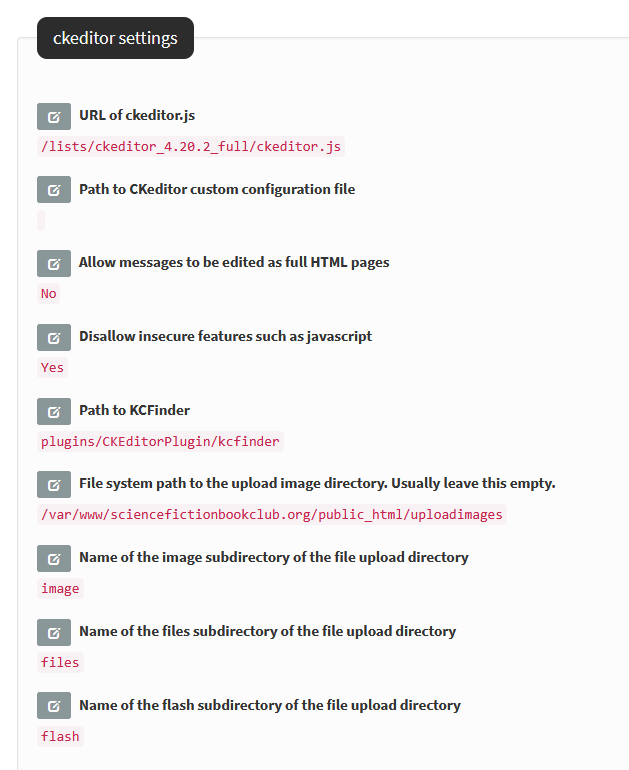
and these are the settings its currently configured with tho:

@Gerard Can you explain what is being mangled? If you view the template source html in ckeditor after it has been changed, how does that differ from that which you loaded directly into the database table?

Original html template, which appears as expected when a campaign is sent

<!doctype html>
<html>
<head>
    <style type="text/css">body{font-family:sans-serif;-webkit-font-smoothing:antialiased;font-size:16px;line-height:1.4;}</style>
    <meta name="viewport" content="width=device-width" /><meta http-equiv="Content-Type" content="text/html; charset=UTF-8" />
    <title>[SUBJECT]</title>
</head>
<body bgcolor="#FFFFFF" style="background-color:#FFFFFF;font-family:sans-serif;-webkit-font-smoothing:antialiased;font-size:16px;line-height:1.4;margin:0;padding:0;-ms-text-size-adjust:100%;-webkit-text-size-adjust:100%;">
<div style="color:transparent; display:none !important; font-size:1px; height:0; line-height:1px; max-height:0; max-width:0; mso-hide:all; opacity:0; overflow:hidden; visibility:hidden; width:0">[PREHEADER]</div>
<center>
<table bgcolor="#FFFFFF" border="0" cellpadding="0" cellspacing="0" class="body" role="presentation" style="background-color:#ffffff; border-collapse:separate; mso-table-lspace:0pt; mso-table-rspace:0pt; width:100%">
    <tbody>
        <tr>
            <td align="center" class="container" style="font-family:sans-serif; font-size:16px; margin:0 auto; max-width:1000px; padding-bottom:10px; padding-left:10px; padding-right:10px; padding-top:0px; vertical-align:top">
            <div class="templatecontent" style="box-sizing:border-box; display:block; margin-bottom:0; margin-left:auto; margin-right:auto; margin-top:0; max-width:800px; padding:0"><!-- LOGO -->
            <div class="logo" style="padding-bottom:10px; text-align:center"><a href="https://www.wimbledonbookclub.com" target="_blank"><img src="https://www.wimbledonbookclub.com/wp-content/uploads/2024/10/Email_Header_1000x240.png" alt="šŸ“š Wimbledon Book Club – Merton's finest book club" style="-ms-interpolation-mode:bicubic; border:none; display:block; height:auto; max-width:1000px; width:100%" /> </a></div>
            <!-- MAIN CONTENT -->
            <table bgcolor="#FFFFFF" class="main" role="presentation" style="background:#ffffff; border-collapse:separate; border-radius:3px; mso-table-lspace:0pt; mso-table-rspace:0pt; width:100%">
                <tbody>
                    <tr>
                        <td class="wrapper" style="box-sizing:border-box; font-family:sans-serif; font-size:16px; padding:0; vertical-align:top">
                        <table border="0" cellpadding="0" cellspacing="0" role="presentation" style="border-collapse:separate; mso-table-lspace:0pt; mso-table-rspace:0pt; width:100%">
                            <tbody>
                                <tr>
                                    <td style="font-family:sans-serif; font-size:16px; vertical-align:top"><span class="preheader" style="color:transparent; display:none; height:0; max-height:0; max-width:0; mso-hide:all; opacity:0; overflow:hidden; visibility:hidden; width:0">This is preheader text. Some clients will show this text as a preview. </span> [CONTENT]</td>
                                </tr>
                            </tbody>
                        </table>
                        </td>
                    </tr>
                </tbody>
            </table>
            <!-- FOOTER -->
            <div class="footer" style="clear:both; margin-top:10px; text-align:center; width:100%">
            <table border="0" cellpadding="0" cellspacing="0" role="presentation" style="border-collapse:separate; mso-table-lspace:0pt; mso-table-rspace:0pt; width:100%">
                <tbody>
                    <tr>
                        <td class="templatecontent-block" style="font-family:sans-serif; font-size:13px; padding-bottom:10px; padding-top:10px; vertical-align:top"><span class="apple-link" style="color:#999999; font-size:12px; text-align:center">[FOOTER]</span></td>
                    </tr>
                </tbody>
            </table>
            </div>
            <!-- END FOOTER --></div>
            </td>
        </tr>
    </tbody>
</table>
</center>
</body>
</html>

mangled version as viewed in the ā€œManage Campaign Templatesā€ screens


<p>
    [PREHEADER]
</p>
<table class="table layout-table" style="background-color:#ffffff;width:100%;" role="presentation">
    <tbody>
        <tr>
            <td style="padding:0px 10px 10px;text-align:center;vertical-align:top;">
                <p style="margin-left:auto;">
                    <!-- LOGO -->&nbsp;
                </p>
                <figure class="image">
                    <a href="https://www.wimbledonbookclub.com"><img src="https://www.wimbledonbookclub.com/wp-content/uploads/2024/10/Email_Header_1000x240.png" alt="šŸ“š Wimbledon Book Club – Merton's finest book club"></a>
                </figure>
                <p style="margin-left:auto;">
                    <!-- MAIN CONTENT -->&nbsp;
                </p>
                <table class="table layout-table" style="background-color:#ffffff;width:100%;" role="presentation">
                    <tbody>
                        <tr>
                            <td style="padding:0;vertical-align:top;">
                                <table class="table layout-table" style="width:100%;" role="presentation">
                                    <tbody>
                                        <tr>
                                            <td style="vertical-align:top;">
                                                <span style="color:transparent;">This is preheader text. Some clients will show this text as a preview. </span>[CONTENT]
                                            </td>
                                        </tr>
                                    </tbody>
                                </table>
                            </td>
                        </tr>
                    </tbody>
                </table>
                <p style="margin-left:auto;">
                    <!-- FOOTER -->&nbsp;
                </p>
                <table class="table layout-table" style="width:100%;" role="presentation">
                    <tbody>
                        <tr>
                            <td style="padding-bottom:10px;padding-top:10px;vertical-align:top;">
                                <p style="text-align:center;">
                                    <span style="color:#999999;">[FOOTER]</span>
                                </p>
                            </td>
                        </tr>
                    </tbody>
                </table>
                <p style="margin-left:auto;">
                    <!-- END FOOTER -->&nbsp;
                </p>
            </td>
        </tr>
    </tbody>
</table>

Yes I’ve tested it again, first by loading a different template and sending some test mails, which are send as expected, then loading the template file outlined above and it once again transforms it into the mangled version.

OK I’ve found the issue.

The CKEditor5Plugin version 1.0.0+20250222 was enabled on the site which was mangling the template. When I default back to the non v5 CKEditorPlugin everything works as expected.

:+1: