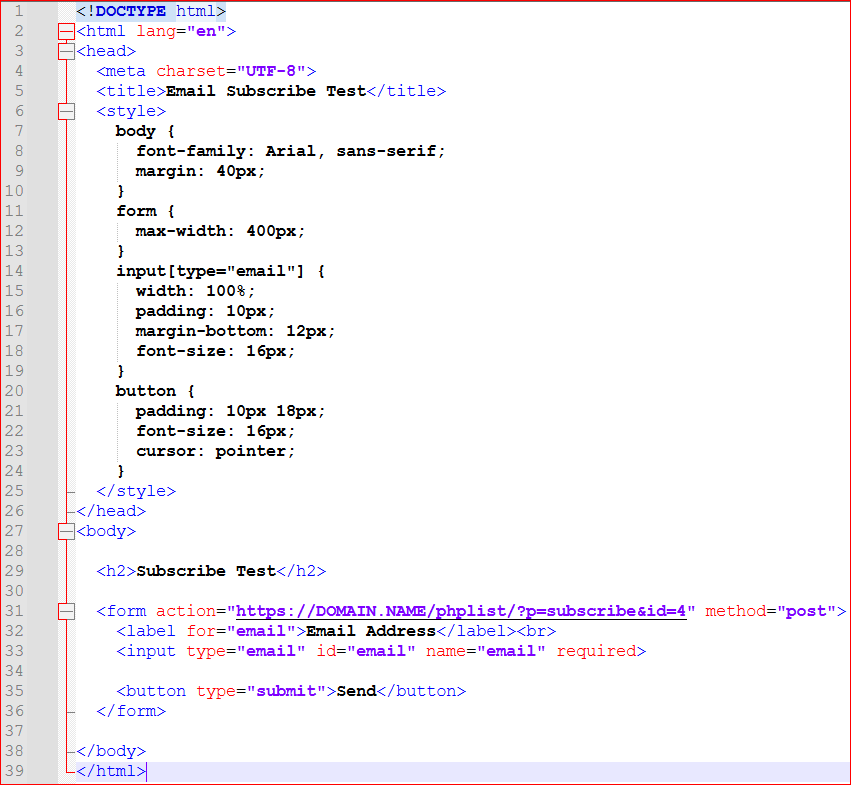
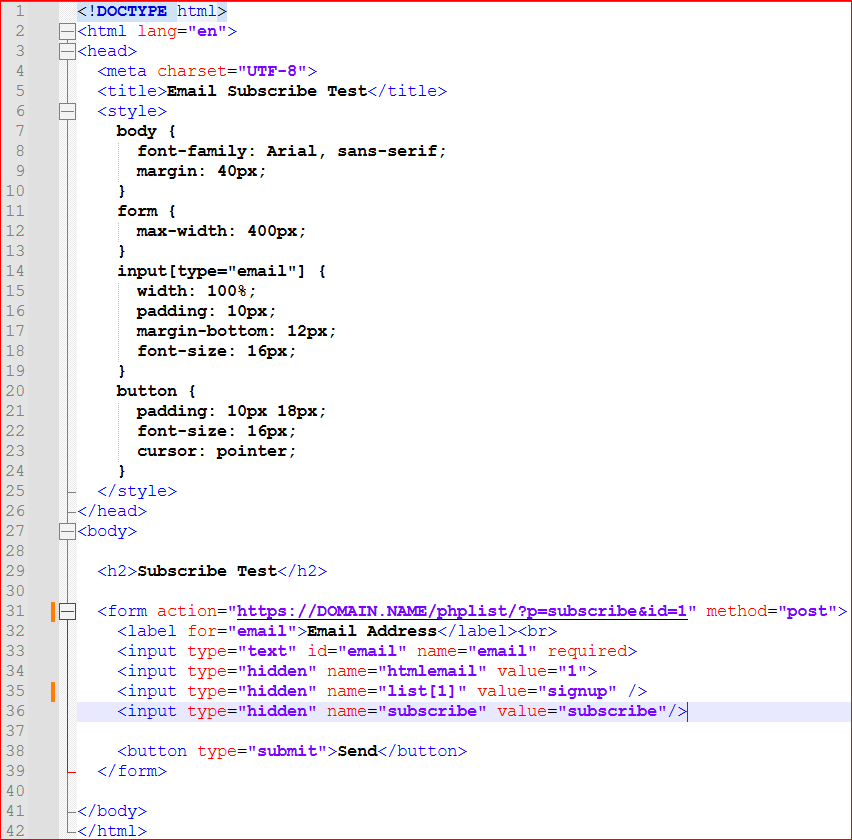
Let me start off by saying I have searched the documentation and Google’d but can’t find a correct (or verifiable) answer to what I’m looking for.
I just installed phpList on my website the other day. I have one list let’s name it “mylist”. I have been trying to figure out just exactly how I can set up something on my website that if someone “Subscribes To mylist”, it will send an email to whatever email address it needs to, and automatically enroll the user without any need for verification. Then that way, when I go in and create a mass mail message, it can send to everyone on that list.
If I am using phpList incorrectly for this, please let me know and I will look for a different option. If someone has the documentation page(s) that will point me to this information, I am ready to read!
I was able to create the mailing portion so if I go to mydomain/phplist, it brings up the page where I can subscribe to the list and it adds the user to “mylist” and sends them an email to click the link to verify, etc. etc.
I was wondering how I can incorporate that exact thing by sending a simple email to something, or is there a way to even do that?
If I have to specifically use the page I see that is offered by phpList, then I will have to figure out a way to incorporate that in to my current website.
I appreciate the information and sorry for the ask.
Thank you, sir! I see the variables on your “post to” command, so I will manipulate what I have with that.
Thank you, that is what I needed. I was also having an issue trying to figure out how to send something to the mailing list (from outlook, etc.), but after reviewing dox and other things, it seems like my best (and pretty much only way) to do it is just log in to the PHPList Admin side of my domain, create a Campaign Template, and then update that accordingly and send that way.
I am on the right track, correct? I can’t find anything in any documentation I am reading for PHPList regarding sending via external email outside of the admin panel.
@WebmasterChuck phplist doesn’t support receiving an email from an external email program as you described. If you want to use an external editor for that you can then just copy/paste the underlying HTML into the phplist campaign.
This is now working… After reviewing a page on this forum I found from 2016’ish, I found I was missing two input fields. I added those to my form, and bam - works like a champ.
The only thing I need to do now, is get the Ajax response to to populate on my website, and not send to the actual phpList page.
Thanks for the other set of eyes, and letting me speak aloud here…
@duncanc - That is what I thought, which I am 1000000% OK with. This has the bare minimums I am looking for. Nothing fancy, nothing over the top.
The biggest issue I am having is the subscription.. I am using the URL that is under “Config>Setting>Subscription Settings”, and have even verified that Subscribe link to what you have on your page. I am currently using: https://DOMAIN.NAME/phplist/?p=subscribe&id=4 (4 is the # of the “subscribe list” I want the person to be added to), which when I make a simple little test form (see code at bottom of this message), no matter what I do, it just takes me to a subscribe page asking me to confirm the email address I actually put in on the empty field when I clicked my send button, and wants me to check or uncheck the box to do HTML. Since the EMail address is actually getting there, I know the test form is sending something over. I even deleted all the subscribe pages for testing purposes, so there shouldn’t be anything that it dumps me to I wouldn’t think.
@WebmasterChuck Use the preformat toolbar button </> if you want to include code or html.
The id parameter is of a subscribe page not a list. You need to create a subscribe page that offers only list id 4 and follow the guidance on the page that I previously linked Creating a subscribe page | phpList manual
That works perfectly fine, and my only issues are below, which I am trying to read through forums, dox, etc., to figure out…
*) EMail’s coming from phpList are going to my spam box. Normal emails sent via the contact form on my website do not end up in my spam folder, so trying to figure out the difference. I downloaded the DKIM plug-in and populated according to the dox on that site, but still going to spam. Looks like it is because of the phplist.png file or whatever the image file is that is automatically included in the email. That’s what Outlook is reporting why it’s going to spam.
*) The AJAX is returning the phpList confirm page. My website already uses a shitload of AJAX and whatnot, so just need to now work on getting the response like what you have on your site. I just need to figure out the AJAX response info (success|error|fail, etc.) so I know what to expect. I realize it won’t return anything from the test code listed accordingly, so I will just work on getting that to my actual website incorporation.
*) Trying to figure out if there is a way to get the subscriber to be confirmed without having to go through the confirmation email, etc.
Other than that, I think I am getting a krapload closer, so I appreciate you pointing me in the right direction yesterday.
@WebmasterChuck You need to follow exactly the steps in the documentation that I linked to Creating a subscribe page | phpList manual Trying to copy from my web site is probably a bit unclear exactly what needs to be copied or changed, so don’t do that.
You need to use the correct name and id attributes for this to work and need the javascript as detailed there. That will make the form remain on your web site when it is submitted (which is the whole point of doing this).
There is a configuration setting for phplist to include a text credit instead of the image. Look in the file config/config_extended.php for that and then copy it to the config.php file.
phplist requires subscriptions to be confirmed manually. There isn’t a way to avoid that apart from modifying the code.
@duncanc - I have the form working as expected. I am just working on keeping it on the same page. That is all I have left to do. After reading the link you posted, your initial assistance yesterday, and the other forum posts I found from 2015/2016, they helped tremendously to find out what I was doing wrong.
I figured as much for the double opt-in, which is fine with me. I was just verifying there wasn’t a way to do it as a single opt-in.
@duncanc - I used your subscription_form_example.zip file and just modified the id # to mine. It works and I get the email (even though it goes to my spam folder - phpList is the only thing sent from my website that goes to spam. Normal emails via my regular contact form go to the end users inbox).
However, when I check the DevTools Console, I see this:
Access to XMLHttpRequest at 'https://DOMAIN.NAME/lists/index.php?p=asubscribe&id=1' from origin 'https://www.DOMAIN.NAME' has been blocked by CORS policy: The 'Access-Control-Allow-Origin' header has a value 'https://DOMAIN.NAME' that is not equal to the supplied origin.
Even though I have this in config.php (verified through the phplist config.php viewer):
// For ajax based signup forms (https://discuss.phplist.org/t/solved-ajax-subscribe-api/974) the access-control-allow-origin header
// has to be set properly.
// Add the addresses of the websites you want to allow to perform ajax requests to PHPList.
define('ACCESS_CONTROL_ALLOW_ORIGINS', ['*']);
So I’m not too sure where it is adding the www at when it is sending to the form, but I definitely don’t have the www in the URL when I am testing.
Thanks for all the assistance so far. You have been pointing me in the correct direction.
@duncanc - I threw site re-write in .htaccess to get rid of anything wanting to use www, and resubmitted the form. This time when I did, I got this:
Thanks, you have been added to our newsletter
You will receive an email message to confirm your subscription. Please click the link in the email to confirm
So I believe I am on the right track now, and it is simply time to just incorporate it in to my website now. Much appreciated for all the insight, sir.