For anyone who is interested, I have found the solution for this…
Using Chrome, and using the Developer Tools, ie. under Customise > More tools > …or use ctrl & shift & I
Go through the step that you need to do to clear a list. Having done that
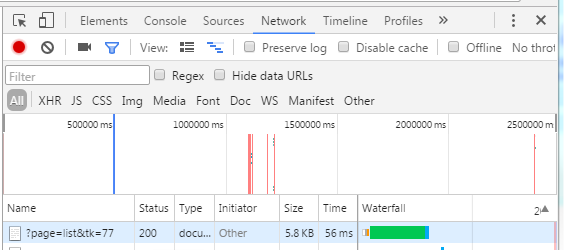
By right clicking on the ?page > Copy > Copy as cUrl (cmd) you can paste the command to notepad.
PS - The same approach can be used for any web page!
With this, and Duncan’s script details given earlier, we can derive the following…
curl -v --cookie-jar cookie.txt -F login=xxx -F password=xxx -F process=continue ‘http://…/admin/?page=home’ >import1.log
TK=$(grep -o ‘tk=[[:alnum:]]*’ import1.log | head -1)
echo $TK >tk.log
curl -v --cookie-jar cookie.txt -b cookie.txt “http://…/admin/?page=members&id=1&$TK” > import2.log
TOKEN=$(perl -ne ‘print “$1” if /name=“formtoken” value=“(.{32})”/’ import2.log)
echo $TOKEN >token.log
curl -v --cookie-jar cookie.txt -b cookie.txt -F formtoken=“$TOKEN” -F ovedestination=3 -F copydestination=3 -F tagaction=nothing -F tagaction_all=delete -F movedestination_all=3 -F copydestination_all=3 -F processtags=“do it” ‘http://…/admin/?page=members&id=1’ >import3.log
…which works perfectly as I needed to clear all member subscribers on list 1
The list can then can be re-populated as required with the cUrl script given before.